Geo Map for Internet Service Monitors | Global Performance Visibility
Hi Site24x7 users,
We’re excited to introduce the Geo Map for internet service and synthetic (browser) monitors.
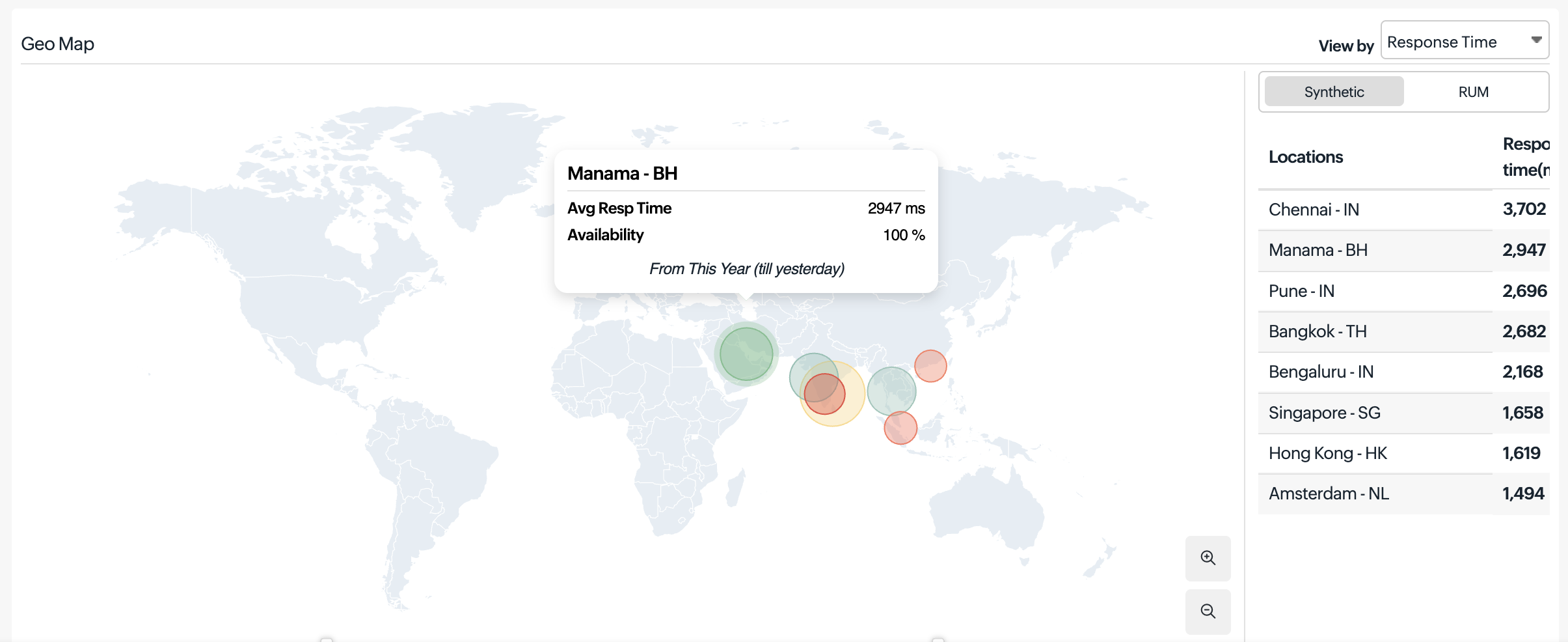
The Geo Map provides an interactive, location-based view of your monitor’s availability and performance across the globe. It visualizes key metrics such as the response time and availability from multiple monitoring locations, helping you understand how your service performs region by region.
How it helps
With this feature, you can quickly identify performance variations, detect service disruptions, and determine whether issues are localized or widespread. This enables faster troubleshooting and helps you reduce your mean time to detect and mean time to resolve issues.
With this feature, you can quickly identify performance variations, detect service disruptions, and determine whether issues are localized or widespread. This enables faster troubleshooting and helps you reduce your mean time to detect and mean time to resolve issues.
To try it out
Follow the steps below to see your availability across global locations:
Follow the steps below to see your availability across global locations:
- Log in to your Site24x7 account.
- Navigate to Monitors and select your internet service monitor.
- Navigate to the Geo Map tab under the performance view.
- Choose the desired metric (Response Time, Availability, or Status) to analyze performance across locations.
Get started
Refer to our help document to learn more about Geo Maps. Feel free to share your feedback, suggestions, and feature requests in the comments below.
Regards,
The Site24x7 team
Topic Participants
Jyotsna R